
Clash for Windows is a rule-based proxy client that lets you control how your internet traffic is routed. Instead of sending all traffic through one server like a VPN, Clash uses rules to decide which websites go through a proxy and which connect directly.
Download Clash for Windows
Clash for Windows is a rule-based proxy client for Windows that helps manage internet traffic with flexible proxy rules.
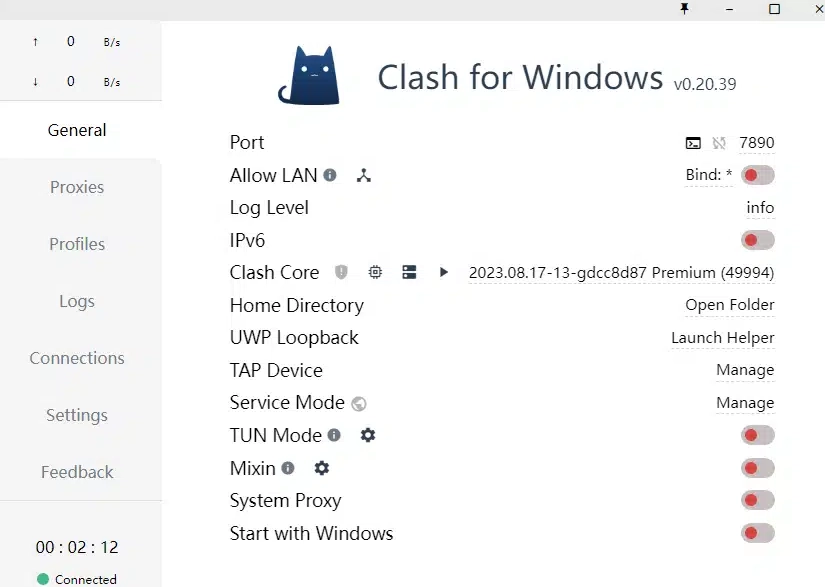
Latest Version Download
To avoid malware or modified builds, always download Clash for Windows from a trusted or official release source.
Supported systems:
- Windows 10
- Windows 11
After downloading, extract the file or run the installer to continue.
What Is Clash for Windows?
Clash for Windows is not a VPN. It is a proxy management tool that uses rules to decide how traffic is routed.
Some websites connect directly, while others go through a proxy — improving speed, stability, and control.
Why Choose Clash for Windows?
- Supports Shadowsocks, VMess, Trojan, SOCKS5, and HTTP
- Rule-based routing for better performance
- Easy subscription import
- Real-time connection and traffic monitoring
- Suitable for both beginners and advanced users
How to Install Clash for Windows
- Download the Clash for Windows package
- Extract or run the installer
- Launch the application
- Clash for Windows will appear in the system tray
No complicated setup is required.
How to Set Up Clash for Windows (Quick Start)
Step 1: Import a Subscription
- Open Clash for Windows
- Go to Profiles
- Paste your subscription URL
- Click Download
Your proxy nodes and rules will be loaded automatically.
Step 2: Select Proxy Mode
For most users, Rule Mode is recommended.
- Rule Mode – Smart routing (best for daily use)
- Global Mode – All traffic goes through proxy
- Direct Mode – No proxy
Step 3: Enable System Proxy
- Open Settings
- Turn on System Proxy
Your browser and apps will now follow Clash rules.
Common Issues After Installation
- Internet not working → Check System Proxy
- Some sites not accessible → Switch nodes or update profile
- Slow speed → Use auto-select proxy groups
Most issues can be fixed in seconds.
Is Clash for Windows Safe?
Clash for Windows itself does not provide servers or collect user data.
Your privacy and security depend on:
- The proxy service you use
- How you configure rules
- Compliance with local laws
Always download from trusted sources.